
Wednesday, October 7, 2015
jUDDI v3.3.1 release!
This release fixes a few bugs and introduces the jUDDI command line client. Enjoy!

Tuesday, August 4, 2015
jUDDI 3.3.0 Release
Today, we have released jUDDI version 3.3.0! This version contains a number of bug fixes and offer's enhanced functionality in the user interface for interacting with tModels. This release resolved a incredible 63 jiras. The release notes are accessible here: Release Notes
You can grab the release at:
Here are some highlights for this version 3.3.0
- Implementation of UDDIv3 Replication API and completed implementation of the Custody Transfer API
- juddi-gui, numerous enhancements, service editor was redesigned to help make binding editing easier and simpler, more i18n work and security fixes
- Nodes can change IDs
- More administrative UI capabilities
- A semi full featured command line jUDDI client (although it was missed in the release binaries)
Friday, December 5, 2014
jUDDI v3.2.1 Released
jUDDI Version 3.2.1 Released
Today we released jUDDI version 3.2.1! This version contains a number of bug fixes and offer's enhanced functionality in the user interface for interacting with tModels. This release resolved a incredible 65 jiras, as you can see in the Release Notes.What new in version 3.2.1?
- Numerous enhancements to juddi-gui (web user interface) including several security fixes, more internationalization support,
- More automated unit tests and refactoring
- Database DDL files are now auto generated with each build
- Fixes for the newer versions of Hibernate
- We're now using GIT for cvs
You can grab the release here:
The website will be updated as soon as the ASF Infrastructure team get the CMS repo up and running again.
Thursday, February 6, 2014
UDDI: Universal Description, Discovery, and Integration
Check out the free chapter on UDDI of the O'Reilly 'Java WebService' book by Tyler Jewell
http://oreilly.com/catalog/javawebserv/chapter/ch06.html
It gives a very nice overview on how to use UDDI in general as well as some good detail on how to use taxonomies.
Cheers,
--Kurt
http://oreilly.com/catalog/javawebserv/chapter/ch06.html
It gives a very nice overview on how to use UDDI in general as well as some good detail on how to use taxonomies.
Cheers,
--Kurt
jUDDI 3.2.0 Released - Now with a full GUI!
jUDDI Version 3.2.0 Released
Today we released jUDDI version 3.2.0! This version marks the first jUDDI release with a full featured console. Suddenly jUDDI has become much easier to use. This release resolved a incredible 206(!) jiras, as you can see in the Release Notes.What new in version 3.2?
- A new end user interface based on Twitter’s Bootstrap
- A new administrative user interface based on Twitter’s Bootstrap with in browser monitoring
- A client side subscription callback API
- Client distribution package
- Many more examples
- WADL to UDDI mappings
- All credentials are now encryptable with command line tools
- Removal of the portlet services
- Deployment templates for JBoss EAP 6+
- Client side digital signature support
- REST style interface for Inquiry API
- Added many more tModels to the base install
- More documentation
Admin and jUDDI GUI Web based consoles
This is the first release that features a the juddi-gui. A screen capture of the juddi-gui Service Editor is shown in Figure 1. A demo cloud instance is running at http://uddiconsole-jbossoverlord.rhcloud.com if you want to try it out. |
| Figure 1. Screen capture of the juddi-gui Service Editor. |
 |
| Figure 2. High Level Application Diagram showing the jUDDI server as well as the admin console and juddi-gui. |
 |
| Figure 3. jUDDI architecture showing the plugable components. |
Getting Started:
Either try out the demo cloud instance, simply download the distribution from http://juddi.apache.org/releases.html, and start the preconfigured tomcat with the UDDI server and GUI; all you have to do is unzip, start tomcat and in your browser navigate to http://localhost:8080/juddiv3.- Then follow the Getting Started Chapter of the jUDDI Guide.
- Scripted support for deployment to other application servers such as JBoss EAP.
- Detailed documentation guides and javadoc.
- Code examples on how to interact with the UDDI server.
Documentation:
http://juddi.apache.org/docs/3.2/juddi-guide/html/http://juddi.apache.org/docs/3.2/juddi-client-guide/html/
Cheers,
--Kurt
Apache jUDDI releases v3.2!
The Apache Software Foundation jUDDI project has just released version 3.2!
This release covers over 200 tickets, has a brand new Bootstrap based user interface and is just simply light years of the previous one in terms of features, usability, test cases and documentation. Enjoy!
More details to be posted soon!
This release covers over 200 tickets, has a brand new Bootstrap based user interface and is just simply light years of the previous one in terms of features, usability, test cases and documentation. Enjoy!
More details to be posted soon!
Saturday, January 4, 2014
Discovering the Discovery Service?
One of the problems that always bothered me with UDDI is that you need to know a number of things in order to find something. Specifically, you need
- The location of the UDDI services, at least the Inquiry
- Information about what you're looking for
- Optionally, credentials
So we need to know where UDDI is before we can look up the where the services are that we want to use? This is almost a catch 22 scenario. Consider a scenario where you have 1000s of web serivce clients, all depending on the UDDI server for figuring out how to route requests. What is the UDDI server location changes? Now you have a few angry IT guys to deal with.
Falling in line with most IT solutions of making things easier and reducing complexity, how do we remove the extra step of locating UDDI? There's a few options and they are all multicast based solutions.
- WS-Discovery (SOAP/UDP) - supported with Apache CXF and Microsoft.NET 4.0
- mDNS/Bonjour/Avahi - very popular with Apple products, not so much for other stuff
- Universal Plug'n Play - popular with games and firewalls, has a bad reputation
The jUDDI team has had a number of discussions about this and have opened a ticket to enable one of these capabilities in the future, currently slated for version 3.3.
If you happen to have an opinion on the subject, please feel free to share.
UDDI as a registry for REST services?
Yes, you read that correctly! Believe it or not, UDDI actually defines a REST endpoint in the spec!

Strangely, we don't really know if anyone else has implemented it not. It's possible that HP/Systinet has it, but Microsoft definitely doesn't! So the really cool neato guys on the jUDDI team thought, why not? Since we're using Apache CXF, it turned out to be low hanging fruit using Jettison.
Starting with jUDDI 3.2, here's all the things you can do with the REST endpoint (pist, there's a WADL too!). Wait, did I say REST? well it's really more of just an HTTP GET endpoint, POST/making changes isn't supported yet.

Strangely, we don't really know if anyone else has implemented it not. It's possible that HP/Systinet has it, but Microsoft definitely doesn't! So the really cool neato guys on the jUDDI team thought, why not? Since we're using Apache CXF, it turned out to be low hanging fruit using Jettison.
Starting with jUDDI 3.2, here's all the things you can do with the REST endpoint (pist, there's a WADL too!). Wait, did I say REST? well it's really more of just an HTTP GET endpoint, POST/making changes isn't supported yet.
- Get the details on any UDDI element (per the spec) in XML
- Get the details on any UDDI element in JSON
- Get the Operational Info on anything in JSON and XML (this is basically the owning username and some time stamps)
- Get all of the execution endpoints of a given service key (this even resolves wsdlDeployments, Hosting directors and more)
There's a few caveats to this, namely that authentication isn't currently supported, so if your turn on the flag to require authentication for the Inquiry service, then this isn't going to work.
Here's a link to the source code for those so inclined.
In the future, we hope to include simplified parts of the find(entity) functions. Frankly, the UDDI spec for searching is insanely complex, thus it will need to be simplified for a URL query string.
In addition, we've added a few things to help make it easier for people to use UDDI to advertise REST services, such as a WADL interpreter that will take all of your well formed and documented WADL files and convert them into UDDI's data structures (pist there's a WSDL interpreter too!). We've also added REST tModels to the default install data.
So the future is looking up for both UDDI and jUDDI.
Edit: I forgot to mention that you can automate the un/registration of both REST and SOAP endpoints in UDDI using the juddi-client jars/dlls? This process is simple and there's a few examples such as this and this.
Edit: It looks like OpenUDDI has the REST endpoint, bravo!
Edit: I forgot to mention that you can automate the un/registration of both REST and SOAP endpoints in UDDI using the juddi-client jars/dlls? This process is simple and there's a few examples such as this and this.
Edit: It looks like OpenUDDI has the REST endpoint, bravo!
Using Category Bags, Identifier Bags, and tModel Instance Infos in UDDI (oh my!)
Seemingly since UDDI was created, there has been confusion as to the differences and usage scenarios for tModels, Category bags, Identifier bags and these wacky things called Key References. So to save everyone, including myself, some time, here's a explanation of these topics, when to use them and when to not. A quick reference guide if you will.
The Technical Model - This thing basically defines any data you want to attach to something in UDDI. More formally, a tModel
The Technical Model - This thing basically defines any data you want to attach to something in UDDI. More formally, a tModel
Describes a "technical model" representing a reusable concept, such as a Web service type, a protocol used by Web services, or a category system (ref)If you were to translate this into programming terms, the closest thing is an Interface. If you're using jUDDI v3.2 comes with almost 100 predefined tModels. Every tModel needs a few things:
- A non empty, non null Name value
- A tModel key, (however some registries will generate one for you, usually a nasty GUID)
- A Category bag Key Reference referencing either "uddi:uddi.org:categorization:types", "uddi-org:types:checked" or "uddi-org:types:unchecked"
Checked vs Unchecked tModels and the little known "ValidatedBy" (source)
- A "Checked" tModel is basically a tModel that whose value conforms to some rules, the most basic is that it the tModel must be defined.
- An "Unchecked" tModel is a tModel whose value could be anything.
- The Validated By (tModel/categoryBag/KeyedReference/tModelkey="uddi:uddi.org:categorization:validatedby") is a special case in which a UDDI server can call a UDDI Value Set Validation endpoint in order to validate that you usage of this tModel is valid. The value of the KeyedReference is actually a bindingTemplate key.
The Category Bag - This element is basically used to categorize UDDI entities. Think of it as a classification or taxonomy mechanism. The most commonly used one is "uddi:uddi.org:categorization:types". Here's an example of how it's used on a UDDI Business Service element in a Category Bag
tModelKey="uddi:uddi.org:categorization:types"
keyName="uddi-org:types:wsdl"
keyValue="wsdlDeployment"
Business Category Bag - The only example provided in the specification for a Business's Category Bag (aside from a UDDI node) is Geographic location.
Business: <keyedReference
tModelKey="uddi:uddi.org:ubr:categorization:iso3166"
keyName="California, USA"
keyName="California, USA"
keyValue="US-CA" />
Service Category Bags - contains a list of business categories that each describes a specific business aspect of the businessService (e.g. industry, product category or geographic region) and is valid in its own category system. source
The UDDI spec doesn't have any explicit examples for service category bags,
Identifier Bag - Holds keyReferences (to keys) that uniquely identify the business (instance) through the specified identification system (D-U-N-S, Tax ID, etc.) which is external to the repository.
In the words of Peer Reynders
The UDDI spec doesn't have any explicit examples for service category bags,
Identifier Bag - Holds keyReferences (to keys) that uniquely identify the business (instance) through the specified identification system (D-U-N-S, Tax ID, etc.) which is external to the repository.
In the words of Peer Reynders
identifierBag contains references to keys that identify the company (BusinessEntity). It answers the question, "Who are you"?
categoryBag contains references to keys that identify the type of business the company is in. It answers the question, "What do you do"?
tModel Instance Info - This is (or at least should be) the most used data element in a UDDI registry. It's part of the Binding Template structure. I'll give you the short version: this is used to define data specific to the end point of the service that's described, such as authentication types, transport mechanism, protocols, SOAP vs REST, or even Quality of Service metrics. Every binding template should have at least a protocol and a transport mechanism defined, but it's not required.
Here's an example from jUDDI's default install data (as of v3.2)
Here's an example from jUDDI's default install data (as of v3.2)
<bindingTemplate bindingKey="uddi:juddi.apache.org:servicebindings-publisher-ws" serviceKey="uddi:juddi.apache.org:services-publisher">
  <description>jUDDI Publisher Service API V3</description>
  <accessPoint useType="wsdlDeployment">http://localhost/.../publisher?wsdl</accessPoint>
  <tModelInstanceDetails>
   <tModelInstanceInfo tModelKey="uddi:uddi.org:protocol:soap" />
   <tModelInstanceInfo tModelKey="uddi:uddi.org:transport:http" />
  </tModelInstanceDetails>
  <categoryBag>
   <keyedReference keyName="uddi-org:types:wsdl" keyValue="wsdlDeployment" tModelKey="uddi:uddi.org:categorization:types"/>
   </categoryBag>
</bindingTemplate>
Important: Most UDDI implementations should enforce referential integrity, meaning that before you can use a reference to a tModel key, the tModel itself must be first created if it doesn't exist already.
So hopefully this clear things up a bit. This is just one guys interpretation of the UDDI v3 spec, but is open to interpretations. Feel free to post a comment if you disagree or have something to add.
So hopefully this clear things up a bit. This is just one guys interpretation of the UDDI v3 spec, but is open to interpretations. Feel free to post a comment if you disagree or have something to add.
Friday, August 9, 2013
UDDI in the OpenShift cloud
Thursday, May 30, 2013
jUDDI v3.2 Preview
We are hard at work making jUDDI better and I figured we would announcement some new features that are planned for the next version. As always, you're welcome to submit your own requests, enhancements, features, or even report problems or patches that you've discovered over at jUDDI JIRA Issue Tracker. These features are tentatively scheduled for 3.2 and may change without notice.
- End user interface (juddi-gui) - This web browser user interface has been blogged here a few times, but it has some great features that will hopefully aid adoption and just make things easier.
- Administrative interface (part of juddiv3.war) - This will be a user interface for administrators to graphically configure jUDDI's many configuration options and to provide browser based access to the administrative functions provided by jUDDI's Web Service API (not the UDDI part).
- Client and Browser side Digital Signature support- enough said
- Additional validation for Subscription APIs
- Support for importing WADL files into a UDDI structure
- REST bindings for the Inquiry API
- Productize the UDDI Technical Conformance Kit - provides a way to test UDDIv3 compliance of any registry
- Client side support for HTTP based authentication
- Configurable SSL stores
- And possibly, a pluggable Access Control mechanism for RBAC, ABAC, GBAC, or whatever else you can dream up.
Until next time.
Don't forget, usually at least one of the jUDDI team members is normally on IRC on Freenode #juddi. Feel free to sign in and drop line.
jUDDI v3.1.5 has been released!
The Apache jUDDI team is pleased to announce the release of jUDDI-3.1.5. Somenew features are validation, some long overdue performance fixes, WSDL2UDDI support, a shiny distro with examples, docs and javadoc and the ability to create wars for a few different platforms and configurations (OpenJPA vs Hibernate and CXF vs JBossWS). That, and lots and lots of bugfixes (see the release notes below). jUDDI-3.1.5 can be downloaded from:
http://juddi.apache.org/Cheers,
the jUDDI team.
Full Release Notes:
Bug
- [JUDDI-363] - Move hibernate and openjpa persistence files out of resources
- [JUDDI-409] - problems in digital signature on entity
- [JUDDI-496] - The tModel is not loaded in the SubscriptionNotifier
- [JUDDI-545] - combineCategoryBags findQualifier not performing correctly when used in find_business call
- [JUDDI-548] - java7 compatibility
- [JUDDI-553] - TModelDetail not deleted when TModel is deleted
- [JUDDI-557] - Update all POMs on example
- [JUDDI-560] - Issues from findbugs
- [JUDDI-561] - Transaction rollback when PersonName Lang is greater than 5 characters
- [JUDDI-562] - CI build integration failures
- [JUDDI-565] - Binding template validation rules are incorrect
- [JUDDI-566] - Using service/binding/
hostingDirector causes a NPE - [JUDDI-568] - If publication of the root publisher fails, juddi goes into an infinite loop
- [JUDDI-569] - Performance Issue fetching service list
- [JUDDI-571] - find_services lang issue
- [JUDDI-572] - Sending a business key for getServiceDetail causing a class cast exception
- [JUDDI-573] - Performance Issue fetching business
- [JUDDI-574] - findTmodel search results does not return the Lang element
- [JUDDI-576] - Fix broken links and old wiki site
- [JUDDI-582] - KeyedReferenceGroup/tModelKey is either not saved or not retrieved
- [JUDDI-589] - find qualifier signaturePresent doesn't appear to follow the spec
- [JUDDI-591] - Add support for email alerts for Subscription API
- [JUDDI-592] - failing unit test on latest trunk
- [JUDDI-612] - Build 'clean' target does not remove the content in juddi-core-openjpa\src\main
Improvement
- [JUDDI-89] - JDBC Datastore performance improvements
- [JUDDI-554] - Link to wiki from participation page goes to a different url
- [JUDDI-555] - Add additional examples for working with UDDI
- [JUDDI-559] - Authentication Tokens do not expire
- [JUDDI-575] - Referential Integrity Check
- [JUDDI-588] - Default Juddi business has services with endpoints starting with ${juddi.server.baseurl}/
juddiv3 - [JUDDI-601] - Add more constant fields and documentation to juddi-client
- [JUDDI-611] - UDDIClerkManager renamed to UDDIClient
New Feature
- [JUDDI-563] - Package a Jboss 5/6 compatible war
- [JUDDI-580] - Validation Framework Enhancements
- [JUDDI-584] - provide a working example of configuring juddi with postgres
- [JUDDI-585] - Add a generated Release class to the juddi-client to provide version information at runtime
Task
jUDDI's extensiblity: Authentication Modules
I've been diving through the jUDDI code and ran across another extensibility point: Authentication modules. Authentication modules are used when the UDDI's AuthToken is utilized on the Security web service. It's function is to point to some kind of user credential store to validate users. Let's first go over what's out of the box.
- org.apache.juddi.v3.auth.JUDDIAuthenticator - this really performs no credential checks. Just give it whatever you want and you'll get a token.
- org.apache.juddi.v3.auth.XMLDocAuthenticator - this validates users against a clear text xml file, normally called "juddi-users.xml"
- org.apache.juddi.v3.auth.CryptedXMLDocAuthenticator - this validates users against an encrypted xml file called "juddi-users-encrypted.xml". This uses the Cipher PBEWithMD5AndDES. I don't believe there's currently any command line utility to encrypt a password, but there is an open ticket for it.
- org.apache.juddi.v3.auth.LdapSimpleAuthenticator - this validates credentials against an LDAP using "simple" authentication (which can send credentials in the clear). It basically tries to connect to LDAP as the user that's attempting to use jUDDI. Most LDAP's require the user to authentication as a distinguished name, such as CN=Bob Smith, OU=Users, DC=mydomain.com, etc. This is a bit of a burden on the user.
All of these classes implement the interface org.apache.juddi.v3.auth.Authenticator. So, if you wanted something a bit more functional than what's provided out of the box. you'll need to implement your own Authenticator. To wire it in, edit the juddiv3.properties file, specifying your class name as the value to the property "juddi.authenticator" and then add the class or jar containing your implementation to juddiv3.war/WEB-INF/classes or judiv3.war/WEB-INF/lib respectively.
Note: there's a few open tickets in jUDDI's JIRA Issue tracker that detail some enhancements to Authenticators.
As always, we appreciate community contributions!
Sunday, May 19, 2013
jUDDI's extensiblity: Subscription Notification Handlers
The upcoming releases of jUDDI 3.1.5 has a number of new features and a lot of bug fixes. Literally, there's at least 100 new unit tests, many of which were initial failures over the previous version. Since the development of 3.1.5 and 3.2 are happening concurrently (3.2 = a shinny new user interface based on Bootstrap), I've used this as an opportunity to really exercise every possible component of the UDDI specification and cross reference stuff that may have been missed with earlier versions.
One of the things that was missed was the capability for Email based alerts when something changes in UDDI via the Subscription API. Pretty cool. I sat there and thought to myself, "wait a second, what if I had some really cool new message delivery method that I want to integrate into jUDDI?"

One of the things that was missed was the capability for Email based alerts when something changes in UDDI via the Subscription API. Pretty cool. I sat there and thought to myself, "wait a second, what if I had some really cool new message delivery method that I want to integrate into jUDDI?"
After a few conversations with Kurt Stam, the jUDDI project lead, I was pleased to find out that this function was already implemented. It just wasn't well documented anywhere. So without further ado, I present a quick how to guide for adding your own protocol handlers to the Subscription API of jUDDI and some basic steps of how to set it up a testing scenario.
Make a new Java library projects in your IDE of choice.
Reference the juddi-core, and uddi-ws projects or JAR files.
Create a class of your own within the following package name:
org.apache.juddi.subscription.notify
The class name MUST follow this pattern:
PROTOCOLNotifier
Where PROTOCOL is the prefix of whatever URL you want users to be able to use. Here's an example using Apache Qpid.
Example URL: amqp://guest:guest@client1/development?brokerlist='tcp://localhost:5672'
Class Name: AMQPNotifier
The Notification class basically takes the protocol of the Access Point's value, splits it on the character ":" and then grabs the first token "amqp" and converts to upper case. Using this pattern you should be able to insert anything you want.
Our new shinny class, AMQPNotifier, must implement the interface org.apache.juddi.subscription.notify.Notifier.
From there, all you need to do is to add in the jars necessary for your transport mechanism and wire in your own code.
Deployment is simple. Add your PROTOCOLNotifier jar and its dependencies to the juddiv3.war/WEB-INF/lib folder.
Note: be careful and watch for conflicting jar file versions. In general, usually moving up a version is ok, but moving down may cause the services to fail unexpectedly.
Time to test. Create a Service with the BindingTemplate's Access Point's value equal to whatever you need.
Next, setup a subscription and reference the BindingTemplate key that represents your call back handler's end point. Finally, change an item that is covered by the subscription's filter and monitor the log files. Hopefully, you won't see an unexpected errors.
The next article, we'll use Apache Qpid as an example, which using the AMQP transport protocol. In order to have a really useful subscription protocol handler, one would need to determine to best use it. AMQP publishers (which is what this example is wiring in) needs a number of settings and possibly credentials or key stores. One option is to bundle all the settings within jUDDI's configuration file (juddiv3.properties), make your own, or enable clients to configure the settings themselves through either a tModelInstance or perhaps through tModel KeyReferences. We're a bit off topic now, but I just wanted to bring up the fact that configuration management of additional protocol handlers (especially for pub/sub mechanisms) can be complex, so think about it and plan ahead.
Saturday, March 9, 2013
jUDDI Dev HowTo: Add a new configuration element
As a noob jUDDI developer, I've found there's a few basic things that haven't been documented that may make someone else's life a bit easier. Without further ado, here's a simple how-to guide for adding new configuration elements to jUDDI (server side)
- Add your property to the actual property files
I simply did a file search for juddiv3.properties and only modified
the ones that were under version control. As of 3.1.4, the require
files are at
juddi-core-openjpa/src/test/resources
juddiv3-war/src/main/webapp/WEB-INF/classes
juddiv3-samples/src/main/webapp/WEB-INF/classes
Simply add a new line towards the bottom with whatever you need. - Within the juddi-core project, locate the class org.apache.juddi.config.Property. Despite its name, it's actually a constants interface class. Add your own custom property name here. Here's an example of one I just added for enforcing the registration of tModels before using them as well as a few other things.
public final static String JUDDI_ENFORCE_REFERENTIAL_INTEGRITY = "juddi.validation.enforceReferentialIntegrity";
- jUDDI uses the Apache Commons Configuration API. Example:
AppConfig.getConfiguration().getBoolean(Property.JUDDI_ENFORCE_REFERENTIAL_INTEGRITY">);
Be sure to change it to the correct data type for whatever you're using. - You're now ready to use it somewhere. In the following example, we are defaulting to a value of false.
            boolean checkRef = false;
            try {
                checkRef = AppConfig.getConfiguration().getBoolean(Property.JUDDI_ENFORCE_REFERENTIAL_INTEGRITY);
            } catch (ConfigurationException ex) {
                log.warn("Error caught reading " + Property.JUDDI_ENFORCE_REFERENTIAL_INTEGRITY + " from config file", ex);
            }
Now you're ready to go test it! - Finally, make new Issue in the issue tracker. Then make a SVN patch, attach it and eventually a commiter will either comment back on it or add it to the baseline,
Monday, March 4, 2013
UDDI HowTo: Create tModels with a custom key
When I first started working with UDDI registries, I came across an interesting use case, attaching data to a binding template. For those in the know, binding templates are UDDI's equivalent to a a specific company's service offering, such as a car mechanic's. The additional data might be performance statistics for the that mechanic, such as "I replace starters within 15 minutes".
Moving on, I had a registered service and wanted to add some data to it. This add on data is expressed as tModels in UDDI. tModels are nothing more than a key, name, value tuple. The catch with UDDI is that all tModel keys need to be registered before they can be used. I was discovered is that registering a new tModel isn't as straight forward as I thought it would be. The rest of the post is a how-to guide for creating new tModels in UDDI by first creating a tModel Generator. A tModel Generator is also known as a tModel Key Partition in jUDDI.
From first hand experience, this process is identical for most of the UDDI services that exist, both commercial and open source.
1) Identify a domain that the tModels are related to. Such as a www.mycompany.com. This will become a "partition" in jUDDI. If you reference the UDDI spec, this is actually called a "keyGenerator"
2) Using the Publishing web service to call "save_tModel" with at minimum the following items defined.
tModelKey = uddi:www.mycompany.org:keyGene
Note: tModel keys, at least in jUDDI, converted to all lower case. Some implementations support mixed case, but to be safe, always use lower case.
Moving on, I had a registered service and wanted to add some data to it. This add on data is expressed as tModels in UDDI. tModels are nothing more than a key, name, value tuple. The catch with UDDI is that all tModel keys need to be registered before they can be used. I was discovered is that registering a new tModel isn't as straight forward as I thought it would be. The rest of the post is a how-to guide for creating new tModels in UDDI by first creating a tModel Generator. A tModel Generator is also known as a tModel Key Partition in jUDDI.
From first hand experience, this process is identical for most of the UDDI services that exist, both commercial and open source.
1) Identify a domain that the tModels are related to. Such as a www.mycompany.com. This will become a "partition" in jUDDI. If you reference the UDDI spec, this is actually called a "keyGenerator"
2) Using the Publishing web service to call "save_tModel" with at minimum the following items defined.
tModelKey = uddi:www.mycompany.org:keyGene
- Name, such as My Company's Keymodel generator
- A KeyedReference tModel in the categoryBag with the following defined: ModelKey="uddi:uddi.org:categ
orization:types" - keyName="uddi-org:
keyGenerator" keyValue="keyGenerator" - An authentication token ( see the Security API)
            SaveTModel st = new SaveTModel();
            st.setAuthInfo(key);
            TModel tm = new TModel();
            tm.setName(new Name());
            tm.getName().setValue("My Company's Keymodel generator");
            tm.getName().setLang("en");
            tm.setCategoryBag(new CategoryBag());
            KeyedReference kr = new KeyedReference();
            kr.setTModelKey("uddi:uddi.org:categorization:types");
            kr.setKeyName("uddi-org:keyGenerator");
            kr.setKeyValue("keyGenerator");
            tm.getCategoryBag().getKeyedReference().add(kr);
            tm.setTModelKey("uddi:www.mycoolcompany.com:keygenerator");
            st.getTModel().add(tm);
3) Send in the request.
            TModelDetail saveTModel = publish.saveTModel(st);
            System.out.println("Creation of Partition Success!");
4) You may now create tModels with keys start with "uddi:www.mycompany.com:" such as uddi:www.mycompany.com:somecus
            tm = new TModel();
            tm.setName(new Name());
            tm.getName().setValue("My Company's Department");
            tm.getName().setLang("en");
            tm.setTModelKey("uddi:www.mycoolcompany.com:department");
            st.getTModel().add(tm);
            saveTModel = publish.saveTModel(st);
            System.out.println("Creation of tModel Department Success!");

            tm = new TModel();
            tm.setName(new Name());
            tm.getName().setValue("My Company's Authentication Method");
            tm.getName().setLang("en");
            tm.setTModelKey("uddi:www.mycoolcompany.com:authmode");
            st.getTModel().add(tm);
            saveTModel = publish.saveTModel(st);
            System.out.println("Creation of tModel Auth Mode Success!");
Note: tModel keys, at least in jUDDI, converted to all lower case. Some implementations support mixed case, but to be safe, always use lower case.
New jUDDI Console is under construction
We have a new contributor, Alex O'Ree, working on a proper console for jUDDI.
Here is a quick snapshot where he is at right now:
Cheers,
--Kurt
Cheers,
--Kurt
Saturday, February 23, 2013
Setting up jUDDI in Eclipse
I recently helped a developer with setting up eclipse, which I thought would be helpful for other people too.
1. Start with a fresh eclipse Juno:
http://www.eclipse.org/downloads/packages/eclipse-ide-java-ee-developers/junosr1
2. Launch eclipse and go to the market place to install:
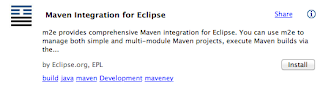
m2e:
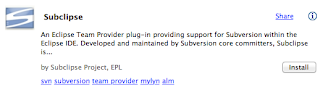
subeclipse:
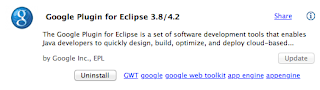
gwt:
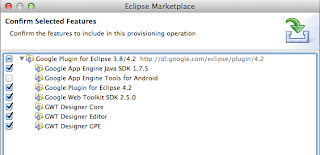
but do not select tools for andriod:
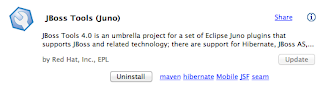
JBoss tools:
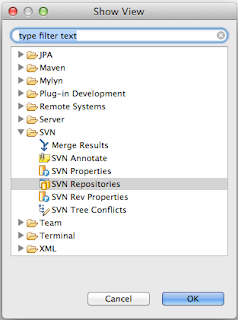
Open the SVN Repository window and add the juddi repository
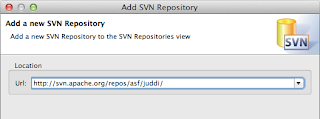
if you get the following error
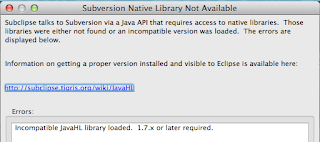
then select the pure Java SVNKit
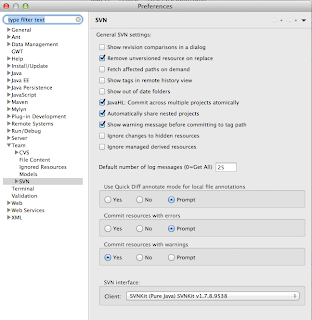
and continue to check out the trunk
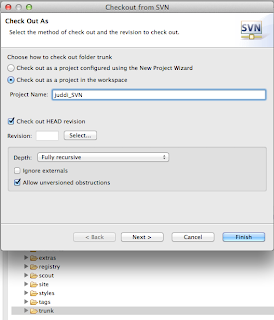
When the checkout completes import all modules as projects using Check out as an existing maven projects
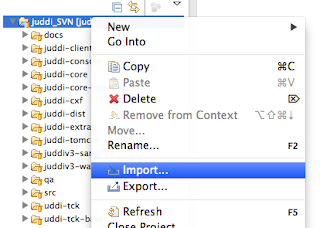
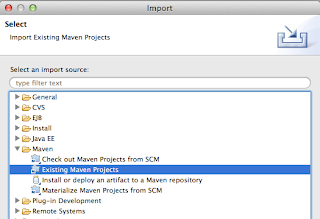
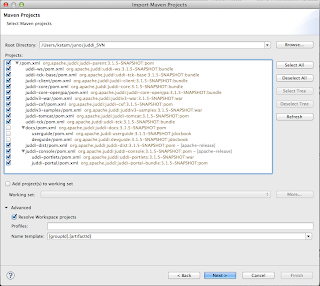
I got the following issues:
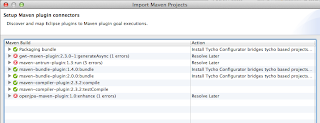
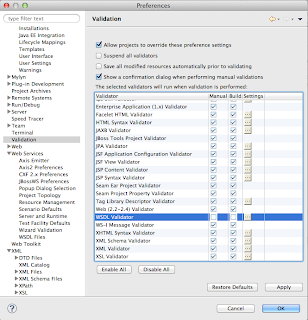
and opted to 'resolve later' and was able to continue. After it created my projects I ended up with errors in some projects. To fix them I needed to stop validation on dtd and wdsl going into the preferences
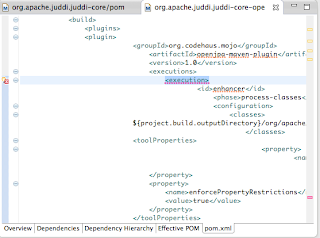
Also in some pom I got lifecycle errors which when hovering over the '' I could set to exclude in eclipse.
3. Now on your file system; go into the juddi-console directory and run
mvn clean install
this will generate some gwt interfaces
when this finishes you may have to Maven > Update project... for the
uddi-portlets project. Make sure the project now looks like
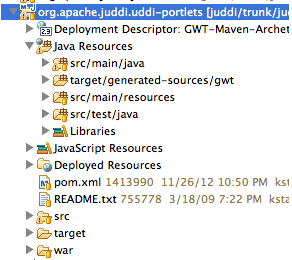
Note the inclusion of target/generated-sources/gwt.
4. Now start tomcat in juddi-tomcat/target/tomcat/apache-tomcat-6.0.26/bin

5. Now you can launch GWT from eclipse
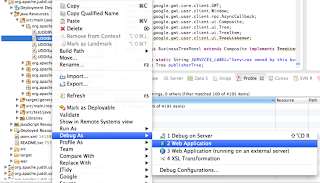
In the Google Development window select to attach to the UDDIBrowser using Chrome.
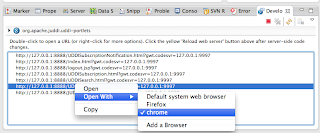
and log in using root/root and see the UDDI Browser
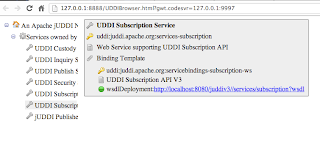
You can then set break points in both client side (the java code that ends up being javascript) and server side code. The server side code of the UDDIBrowser makes calls into the jUDDI back end (running on tomcat). You can start tomcat in debug and attach to the debug socket to step through that code as well.
Beside being able to debug the UDDIBrowser it is also the perfect development environment as changes to the code tend to be live immediately on saving the file (and hitting refresh in the browser).
Well, this ended up much longer then expected! I hope it helps you.
Good luck!
--Kurt
1. Start with a fresh eclipse Juno:
http://www.eclipse.org/downloads/packages/eclipse-ide-java-ee-developers/junosr1
2. Launch eclipse and go to the market place to install:
m2e:

subeclipse:

gwt:

but do not select tools for andriod:

JBoss tools:

Open the SVN Repository window and add the juddi repository


if you get the following error

then select the pure Java SVNKit

and continue to check out the trunk

When the checkout completes import all modules as projects using Check out as an existing maven projects


I got the following issues:

and opted to 'resolve later' and was able to continue. After it created my projects I ended up with errors in some projects. To fix them I needed to stop validation on dtd and wdsl going into the preferences

Also in some pom I got lifecycle errors which when hovering over the '

3. Now on your file system; go into the juddi-console directory and run
mvn clean install
this will generate some gwt interfaces
when this finishes you may have to Maven > Update project... for the
uddi-portlets project. Make sure the project now looks like

Note the inclusion of target/generated-sources/gwt.
4. Now start tomcat in juddi-tomcat/target/tomcat/apache-tomcat-6.0.26/bin

5. Now you can launch GWT from eclipse

In the Google Development window select to attach to the UDDIBrowser using Chrome.

and log in using root/root and see the UDDI Browser

You can then set break points in both client side (the java code that ends up being javascript) and server side code. The server side code of the UDDIBrowser makes calls into the jUDDI back end (running on tomcat). You can start tomcat in debug and attach to the debug socket to step through that code as well.
Beside being able to debug the UDDIBrowser it is also the perfect development environment as changes to the code tend to be live immediately on saving the file (and hitting refresh in the browser).
Well, this ended up much longer then expected! I hope it helps you.
Good luck!
--Kurt
Monday, February 27, 2012
First time running he JAXR TCK with a UDDI v3 Registry
I just ran the JAXR TCK tests using Scout-1.2.5 and a jUDDI-3.1.3 instance as the Registry backend. I was pleasantly surprised:
Test results: passed: 1,340; failed: 32
32 fails.. Almost there! Back to bug fix mode.
-----------------------
Update:
It looks like I found one real bug in scout (SCOUT-129) and one issue to with being backwards compatible with UDDI v2 default settings (SCOUT-127). A full run of all the JAXR tests results now in:
Test results: passed: 1,372
no fails, Hurray :)!
Going to prepare Scout-1.2.6.
Test results: passed: 1,340; failed: 32
32 fails.. Almost there! Back to bug fix mode.
-----------------------
Update:
It looks like I found one real bug in scout (SCOUT-129) and one issue to with being backwards compatible with UDDI v2 default settings (SCOUT-127). A full run of all the JAXR tests results now in:
Test results: passed: 1,372
no fails, Hurray :)!
Going to prepare Scout-1.2.6.
Tuesday, February 21, 2012
Using JAXR on JBoss 7.1.1
Introduction
One of the Technologies specified in the JEE6 Specification is the Java API for XML Registries (JSR 93). Apache Scout is the implementation of this specification. This specification is a client side library to interact with an XML Registry. Examples of XML Registries are UDDI and ebXML. To make a long story short, every Application Server needs to ship with a JAXR implementation, and this is what I have been helping out on.
JBoss JAXR module
On and off over the last few months I have been working on a JAXR module for JBoss-AS-7.1. The requirement for it was such that it needed to pass the JEE6 TCK, and that it should be able to interact with both UDDI v2 and v3 registries. Previous version of JBoss-AS have always shipped with a jUDDI v2 registry but, for the time being, it was decided to ship the client libraries only this time, which is the only JEE6 required component anyway. In other words, you need to have a running instance of jUDDI for the JAXR module to connect to.
How to use it?
Your deployment will only need to depend on the JAXR API, if you are using maven add the following to the dependencies section in your pom:
What if I don't want to use the default JAXR module configuration?
The default JAXR configuration lives in the standalone/configuration/standalone.xml:
JAXR specifies the following properties:
 Figure 1. The JAXR properties as specified in the JAXR specification.
and by default the following properties are set:
Additionally, when using the Scout implementation is used, the following properties are set by default
To use JAXR in the default configuration, simply use a standalone/configuration/standalone.xml with the following jaxr section:
This means that by default Scout connects to the UDDI registry using the UDDI v2 API specification, using the SaajTransport class. It is this configuration that was used for TCK compatibility testing as the JAXR specification has not been updated since the UDDI v3 specification was published.
What if I want to connect to a UDDI v3 Registry?
The Apache Scout implementation supports connecting to a UDDI v3 registry. For this it uses the jUDDI-client library, and the JBoss JAXR module supports using the following configuration in the standalone/configuration/standalone.xml:
Override the properties set in the configuration
In the first code fragment of this blog post it was shown that you can set properties before using the connection, using jaxrFactory.setProperties(properties). This will add these properties, or override the defaults. This way you can override property setting programmatically.
This concludes this post on using JAXR on JBoss-AS7.1. If you would like to add an entry on how to use Scout on another Application Server, then by all means send it to us and we will add it!
Cheers,
--Kurt
One of the Technologies specified in the JEE6 Specification is the Java API for XML Registries (JSR 93). Apache Scout is the implementation of this specification. This specification is a client side library to interact with an XML Registry. Examples of XML Registries are UDDI and ebXML. To make a long story short, every Application Server needs to ship with a JAXR implementation, and this is what I have been helping out on.
JBoss JAXR module
On and off over the last few months I have been working on a JAXR module for JBoss-AS-7.1. The requirement for it was such that it needed to pass the JEE6 TCK, and that it should be able to interact with both UDDI v2 and v3 registries. Previous version of JBoss-AS have always shipped with a jUDDI v2 registry but, for the time being, it was decided to ship the client libraries only this time, which is the only JEE6 required component anyway. In other words, you need to have a running instance of jUDDI for the JAXR module to connect to.
How to use it?
Your deployment will only need to depend on the JAXR API, if you are using maven add the following to the dependencies section in your pom:
Now you can get a handle to the JAXR ConnectionFactory simply by looking it up in JNDIjavax.xml jaxr-api 1.0_04 provided
InitialContext context = new InitialContext();
ConnectionFactory jaxrFactory = (ConnectionFactory) context.lookup("java:jboss/jaxr/ConnectionFactory");

Properties properties = new Properties();
...
//set some JAXR properties
...
jaxrFactory.setProperties(properties);

connection = jaxrFactory.createConnection();

//now you can set the credentials on this connection.
PasswordAuthentication passwdAuth = new PasswordAuthentication(userid, passwd.toCharArray());
Set creds = new HashSet();
creds.add(passwdAuth);
connection.setCredentials(creds);
at this point you should be able to execute any JAXR registry command. Make sure to add your own exception handling.What if I don't want to use the default JAXR module configuration?
The default JAXR configuration lives in the standalone/configuration/standalone.xml:
| connection-factory attribute | default value | description | required |
|---|---|---|---|
| jndi-name | - | Name used to bind into JNDI | Y |
| class | org.apache.ws.scout. registry.ConnectionFactoryImpl | Class name of the JAXR implementation the JAXR module will instantiate | N |
| property attribute | default value | description | required |
| name | - | Name of the JAXR property | Y |
| value | - | Value of the JAXR property | Y |
JAXR specifies the following properties:

and by default the following properties are set:
| JAXR property name | default value |
|---|---|
| javax.xml.registry.queryManagerURL | http://localhost:8080/juddi/inquiry |
| javax.xml.registry.lifeCycleManagerURL | http://localhost:8080/juddi/publish |
Additionally, when using the Scout implementation is used, the following properties are set by default
| Scout property name | default value |
|---|---|
| scout.proxy.uddiVersion | 2.0 |
| scout.proxy.uddiNamespace | urn:uddi-org:api_v2 |
| scout.proxy.transportClass | org.apache.ws.scout.transport.SaajTransport |
To use JAXR in the default configuration, simply use a standalone/configuration/standalone.xml with the following jaxr section:
This means that by default Scout connects to the UDDI registry using the UDDI v2 API specification, using the SaajTransport class. It is this configuration that was used for TCK compatibility testing as the JAXR specification has not been updated since the UDDI v3 specification was published.
What if I want to connect to a UDDI v3 Registry?
The Apache Scout implementation supports connecting to a UDDI v3 registry. For this it uses the jUDDI-client library, and the JBoss JAXR module supports using the following configuration in the standalone/configuration/standalone.xml:
Override the properties set in the configuration
In the first code fragment of this blog post it was shown that you can set properties before using the connection, using jaxrFactory.setProperties(properties). This will add these properties, or override the defaults. This way you can override property setting programmatically.
This concludes this post on using JAXR on JBoss-AS7.1. If you would like to add an entry on how to use Scout on another Application Server, then by all means send it to us and we will add it!
Cheers,
--Kurt
Subscribe to:
Posts (Atom)